
This Beginner’s Guide is made only for beginners who want to start affiliate marketing without confusion or stress. Follow it step by step, and you’ll feel confident very quickly 😊
First of all you need Gmail id and ChatGpt.
🔰Do This First : Choose Your Niche & Create a Google Account
Before signing up anywhere, there are two small but very important things you must do.
🟢 Step 1: Choose a Niche You Like
A niche means the type of products you want to share.
👉Choose something:
You like
You understand
You can talk about easily
✅Beginner-Friendly Niche Examples:
Mobile & gadgets
Fashion & clothing
Beauty & skincare
Home & kitchen items
Fitness & health products
Baby & kids products
For full Macro and Micro Niches list 👉 click here
- 💡Tip:
- If you enjoy the niche, you won’t feel tired or bored later.
🟢 Step 2: Choose an Attractive Name Based on Your Niche
Pick one simple, catchy name related to your niche.
✅Good Name Examples:
SmartDealsHub
TrendyFinds
DailyOfferZone
BudgetBuyIndia
StylePickStore
✅COPY-PASTE PROMPT: Brand Name Generator
Prompt:
I want to start affiliate marketing. My niche is: [your niche]
Help me: Suggest the best niche for these products
Explain in simple words why this niche is good for beginners
Give me 10 simple, catchy brand names
Make sure the names:
Are easy to remember and spell
Sound trustworthy
Work for Gmail, Facebook, Instagram, Pinterest, and Affilinkpost
Do not use numbers or special characters
Keep everything very simple and beginner-friendly.
💡How Users Should Use This
Open chatgpt.com or install chatgpt application Singup with you Gmail Id
Paste this prompt into ChatGPT
Pick ONE niche
Use the same name everywhere
This makes the affiliate journey clean, professional, and stress-free 🚀
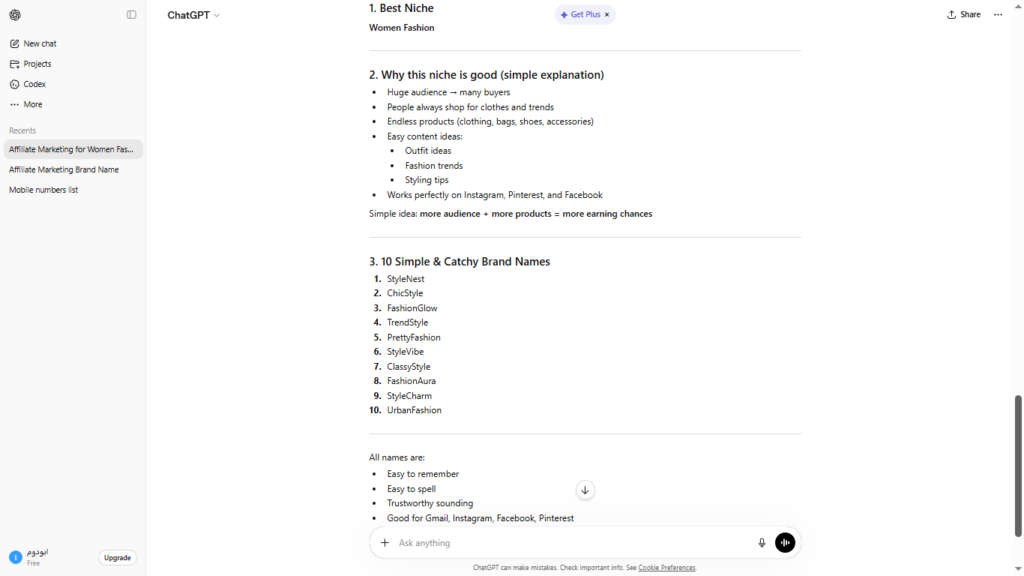
For Example I use the prompt and I past Niche name as [Women Fashion] and past it in ChatGPT I got this result
10 Simple & Catchy Brand Names:
- StyleNest
- ChicStyle
- FashionGlow
- TrendStyle
- PrettyFashion
- StyleVibe
- ClassyStyle
- FashionAura
- StyleCharm
- UrbanFashion
⚠️Important Rule:
👉 Beginner’s Guide Use the SAME name everywhere
Use this name for:
Gmail account
Affilinkpost profile
Facebook page
Instagram account
Pinterest account
or any other social media account
This builds trust and brand identity 👑
🟢 Step 2: Create a Google Account for That Niche
Go to gmail.com
Click Create Account
Create a new email id only for affiliate work don’t use your personal email id.
For example form the up list I chose fashionaura@gmail.com if it is not available try to add numbers like fashionaura123@gmail.com or letters like fashionauratoz@gmail.com chose a good password you can member it write both in private note or paper and save them.
📌This keeps everything clean and professional.
🟢 Step 4: Write It Down & Stick to It
- Don’t change names again and again
One niche + one name = better growth
Google and social media love consistency
✨Beginner’s Guide Once this step is done, you are 100% ready to:
➡️ Create your Affilinkpost account
➡️ Start posting products
➡️ Promote confidently
Google and social media love consistency
Keep everything beginner-friendly and easy to understand.
1️⃣ Account Setup (Joining Is Super Easy)
🟢 Step 1: Sign Up
- Open Affilinkpost.com in your browser
- Click “Sign Up” or “Register”
- Enter:
- Your name
- Your email address
- A password you can remember
- Click “Create Account”
✨ Beginner’s Guide That’s it—you’re in!
🟢 Step 2: Log In
Go to Affilinkpost.com
- Click “Login”
- Enter your email and password
- Click “Login”
Beginner’s Guide Also you can Sign Up/Log In easily with you Gmail Id (fashionaura@gmail.com)
🔐 Beginner’s Guide Tip: Don’t share your password with anyone.
🟢 Step 3: Log Out (When You’re Done)
- Click your profile icon (top corner)
- Click “Logout”
✔ Always log out if you’re using a shared device.
2️⃣ Content Preparation (Getting Your Product Ready)
This is the most important and fun part 🎉
🟢 Step 1: Find a Product
- Beginner’s Guide As a beginner and just getting started with affiliate marketing, it’s best to begin with a beginner-friendly platform. One of the easiest options is EarnKaro, which allows you to quickly sign up and start promoting products without much hassle.
- Through EarnKaro, you can access affiliate programs from popular brands like Flipkart, Myntra, Ajio, mCaffeine, Mamaearth, and The Derma Co, along with many others. This makes it a great platform to practice and understand how affiliate marketing works. go to earnkaro.com and register with your email id and mobile number.
- Once you gain some experience and confidence, you can then move on to more advanced programs like the Amazon Associates. It’s a powerful platform, but slightly more competitive and stricter, so starting with easier networks first is a smart approach.
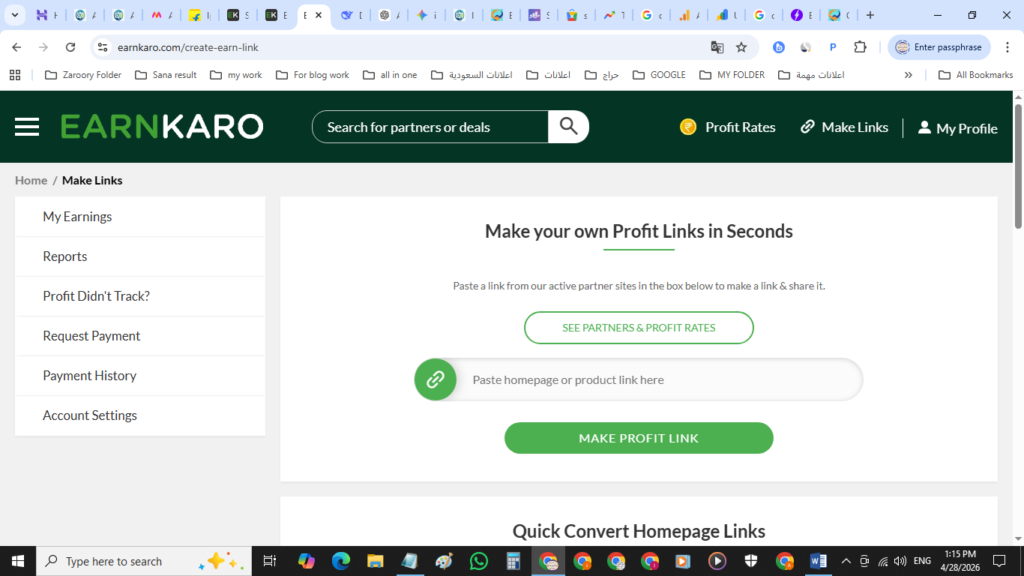
- Go to any affiliate webiste (Flipkart, Myntra, Ajio, mCaffeine, MamaEarth, Derma Co) Choose a product you like and trust copy it is url link of the prouct go to earnkaro click make links up corner past the link in earnkaro Make your own Profit Links in Seconds.
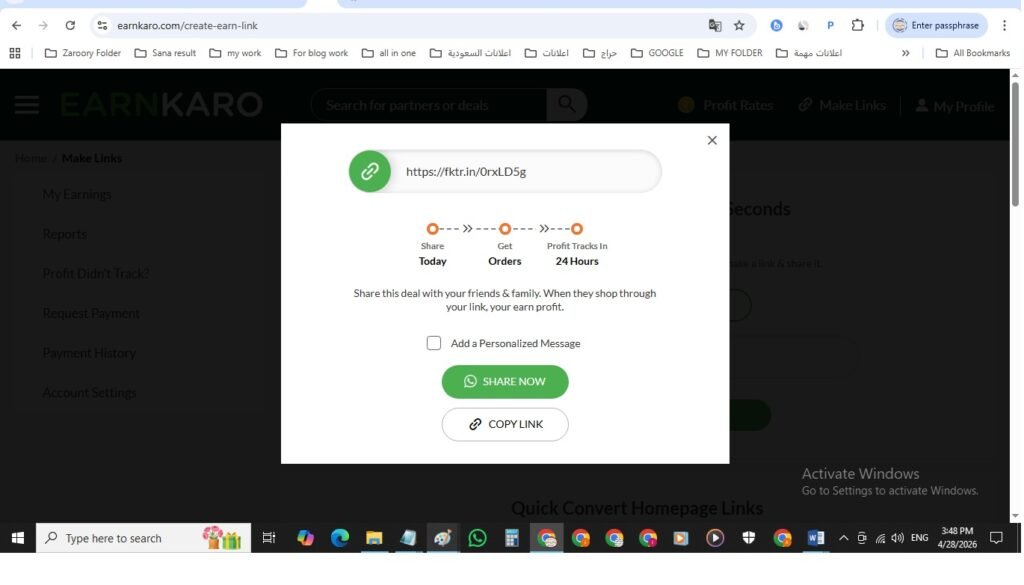
- Copy your affiliate own Profit Links form earnkaro make links (very important!)
🟢 Step 2: Save the Product Image
- Right-click on the product image or make screenshot
- Click “Save Image As”
- Save it on your phone or computer
📸 Use clear, good-quality images for better results.
🟢 Step 3: Create Title & Description Using AI (Very Easy!)
You don’t need to write anything yourself 😌
Just copy-paste this prompt into ChatGPT.
✅ COPY-PASTE PROMPT (For Affilinkpost)
Copy the Affiliate Link form the affiliate websie you chose (Flipkart, Myntra, Ajio, mCaffeine, MamaEarth, Derma Co)
Write a ready-to-post affiliate ad for affilinkpost.com,
kept short (≈70–80 words) with price at the beginning of
the title and clear selling points and attract content,
don’t mention name of any website don’t give my image,
when i give the products detail or products url linke write
the title and cotent very good for SEO and ranking also i
will provid products MRP and percent discont and real price.
Here’s what you must include every time I send you link and details:
✔️ website caption + Description
✔️ Facebook caption + Description + hashtags
✔️ Instagram caption + Description + hashtags
✔️ Pinterest Pin Title Description + hashtags
✔️ Pinterest Alt Text
[PASTE the LINK HERE] (link From Flipkart, Myntra, Ajio, mCaffeine, MamaEarth, Derma Co)
Product Link
MRP Price:
Deal Price:
Discount:
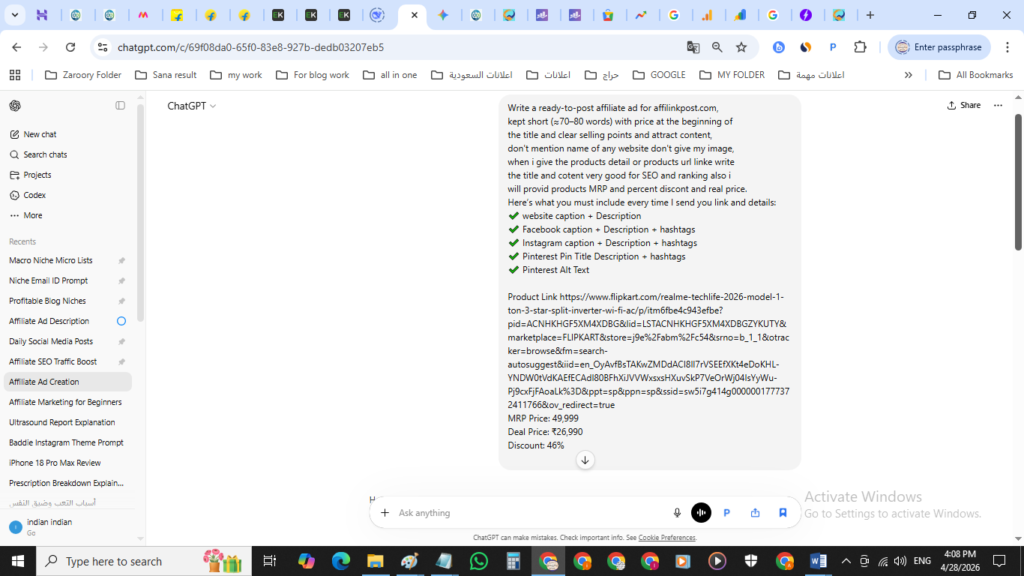
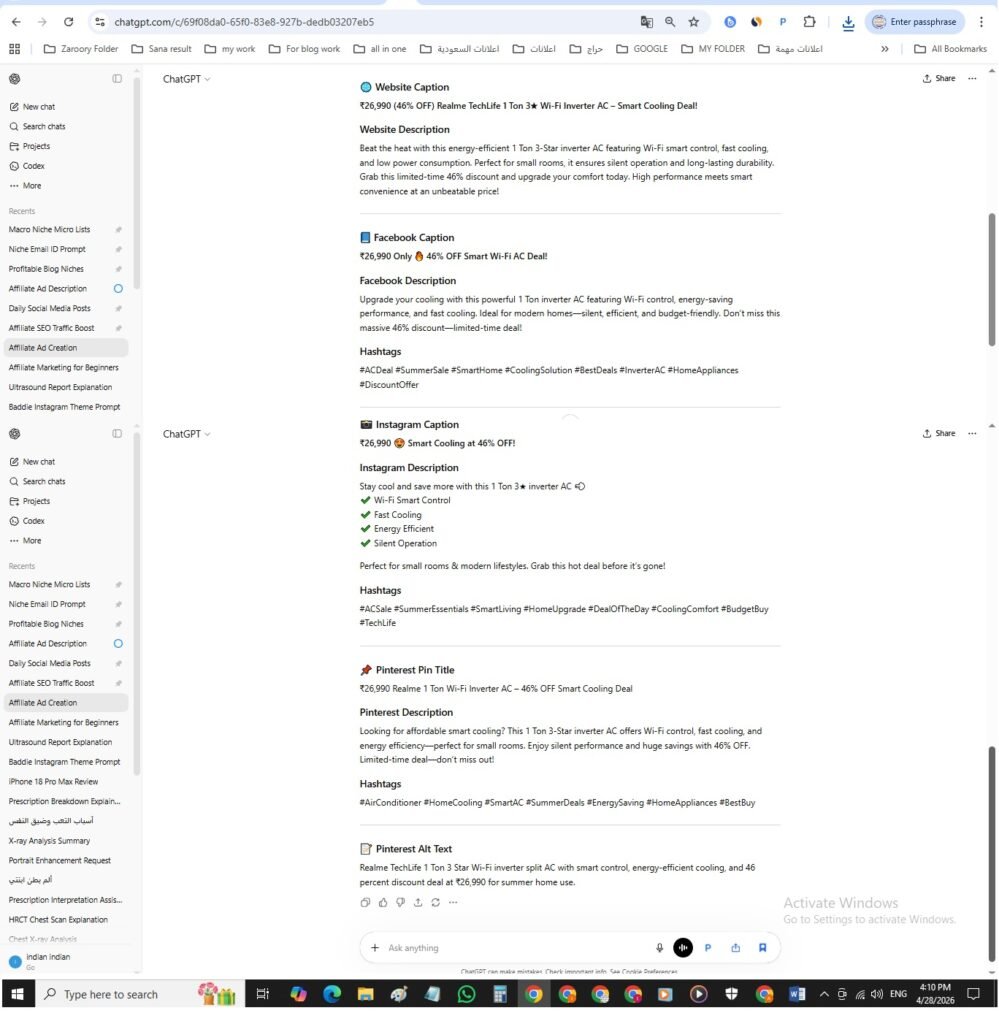
✨ The AI will give you a ready-to-use Title and description for Website affilinkpost,
Facebook, Instagram and Pinterest.
3️⃣ Posting on Affilinkpost (Step by Step)
Now let’s publish your product 🚀
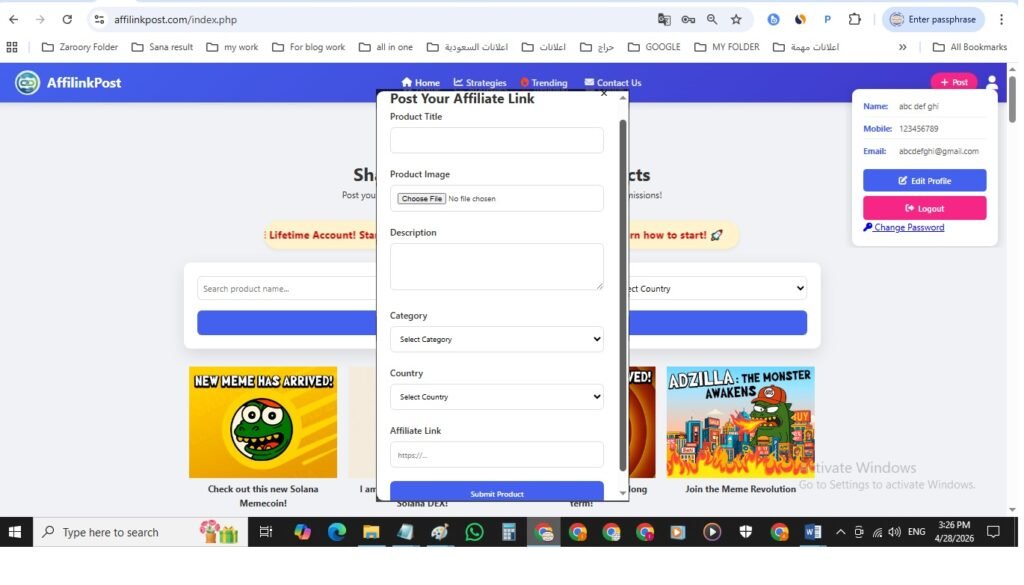
🟢 Step 1: Click “+ Post”
- Log in to Affilinkpost.com
- Click the “+ Post” the red button
🟢 Step 2: Add Title & Description
- Copy the AI-generated title
- Paste it into the Title box
- Copy the AI-generated description
- Paste it into the Description box
🟢 Step 3: Upload Image
- Click “Upload Image”
- Select the product image you saved earlier
🟢 Step 4: Select Category & Country
- Choose the correct product category (Electronics, Fashion, Home, etc.)
- Select the country where the product is available
🟢 Step 5: Paste Affiliate Link
- Paste your affiliate own Profit Links you got form earnkaro make links very important don’t past the products link which you got form the (Flipkart, Myntra, Ajio, mCaffeine, MamaEarth, Derma Co)
- Double-check the link which from earnkaro make links (very important!) it will look like this https://fktr.in/0rxLD5g
🟢 Step 6: Submit
- Click “Submit”
- 🎉 Your product is now live!
4️⃣ Social Media Promotion (Get More Clicks & Sales)
Sharing on social media = more visibility + more chances to earn 💰
🟢 How to Share
From the chatgpt prompt result with social media Title and Description
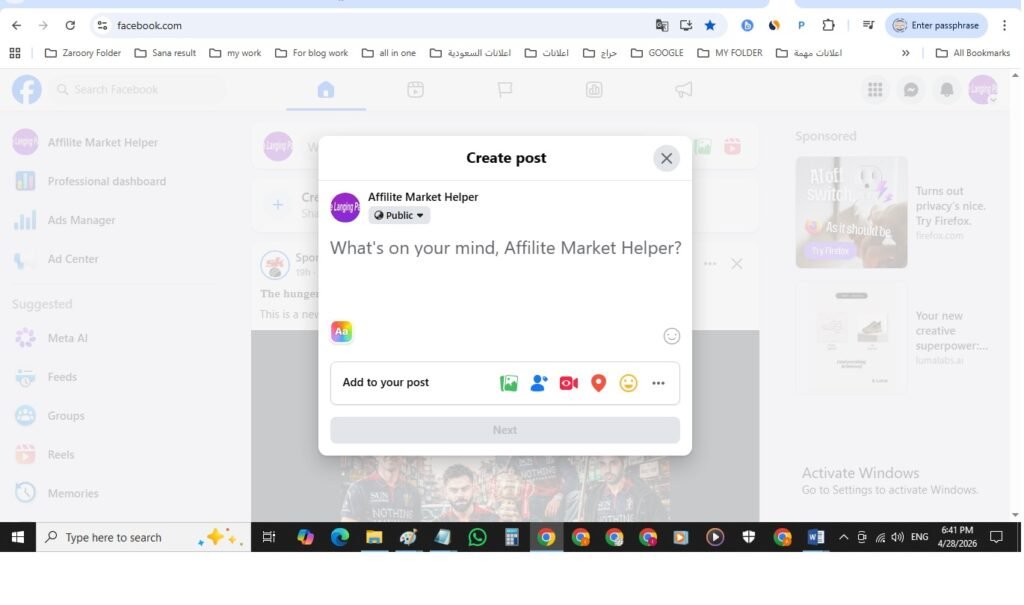
- Facebook: go to Facebook.com login with your gmail id your create it for affiliate click on What’s on your maind, Post your title, description and image
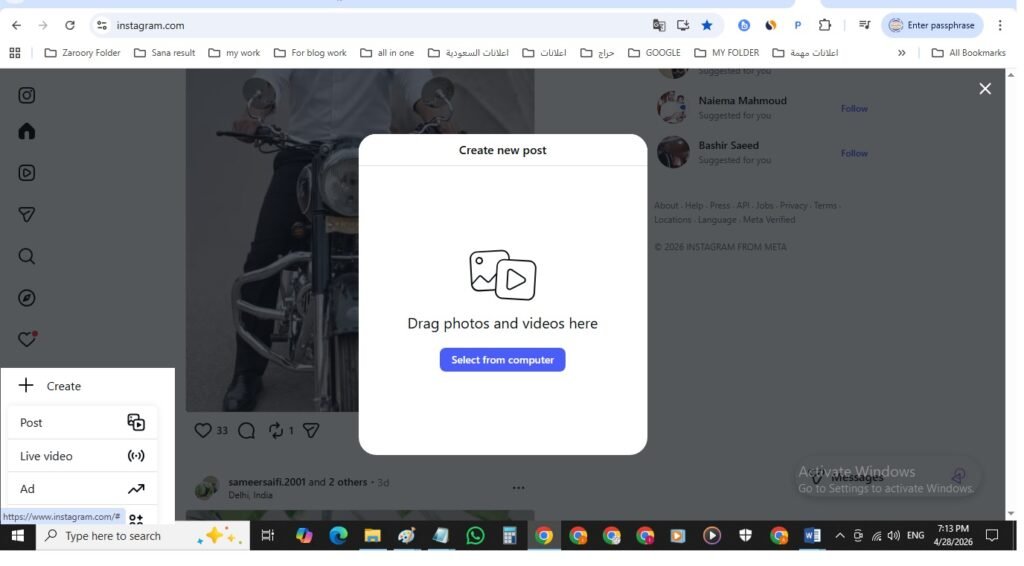
- Instagram: go to instagram.com login with your gmail id your create it for affiliate click on create then post, Select upload image, Post your title, description
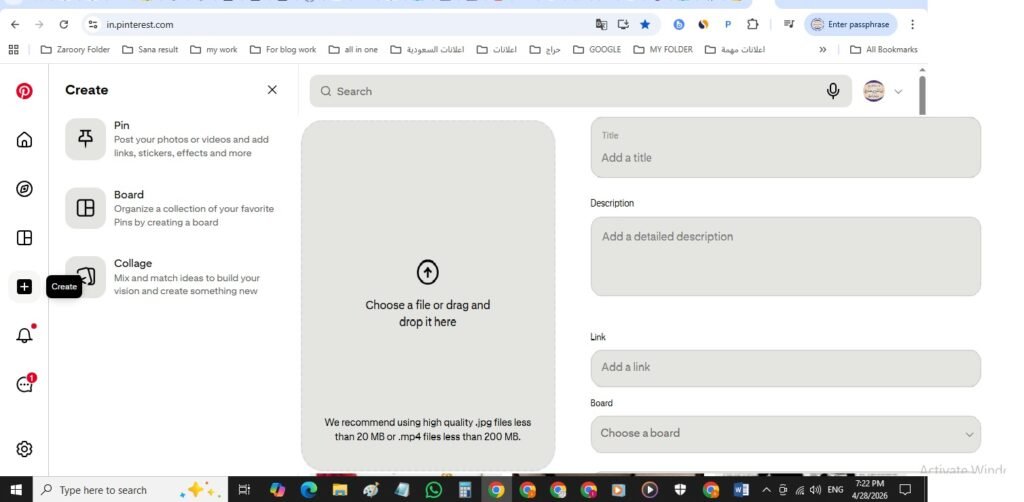
- Pinterest: Go to pinterest.com login with your gmail id your create it for affiliate click on + create, click on pin, Upload image → add title, description, link & Alt Text
📌 Always use your Affilinkpost link or affiliate link.
5️⃣ Weekly Posting Schedule (Perfect for Beginners)
Consistency beats everything 💯
Follow this simple schedule.
📅 Daily Posting Plan
- 2 posts per day
- Morning: 9:00 – 11:00 AM
- Evening: 7:00 – 9:00 PM
- 1–2 posts per day
- Best time: 10:00 AM or 8:00 PM
- 1 post + 2 stories daily
- Best time: 11:00 AM or 9:00 PM
- 3 pins per day
- Best time: 6:00 AM, 12:00 PM, 9:00 PM
📈 Pinterest works slowly but gives long-term results—don’t skip it!
💖 Final Encouragement (Very Important)
- You don’t need experience
- You don’t need perfect English
- You don’t need paid tools
Just:
✔ Follow the steps
✔ Use AI smartly
✔ Stay consistent
Success will come 🌱